Rust / Guide
Sell Rust Skins: Steam Wallet or Real Money?
Sell Rust skins: Steam market, Skinport and instant-sell sites compared – fees, payout, requirements and what you actually keep per €10.
In short
- Start with what you want to do with the proceeds. The Steam market pays wallet credit to spend on Steam. Skinport pays out real money to your bank account. Instant-buy sites pay sooner but generally offer less.
- Compare what you keep after fees, not just the listed market price. On Steam, you receive roughly 87% of the buyer’s total. Minimum fees and rounding affect the result for small amounts.
- Skinport charges 8% for a standard public sale, or 6% for EUR sales of €1,000 or more. The money usually reaches your bank account within 2–5 business days after the sale.
- In our offer data from 8 October 2026, estimated Skinport payouts and Steam wallet proceeds were often close for skins priced between €5 and €100. Cheaper skins showed a bigger gap. The worked comparison below explains how we calculated this.
- Check your own item’s trading status before listing it. A tradable design can still be locked after your purchase. Drops and many DLC items remain permanently bound to your account.
Steam market, Skinport or instant sell?
| Steam market | Skinport | Instant-sell sites | |
|---|---|---|---|
| You get | Steam wallet funds | Money by bank transfer | Depending on the site: PayPal, crypto or bank transfer |
| Fee | 15% (5% Steam + 10% Rust), with a minimum fee | 8% for public sales; 6% on EUR sales of €1,000 or more; 2% for private sales | None shown – the site buys below market price |
| Price | You set it | You set it, with a price suggestion | The site makes an offer |
| When the money arrives | As soon as someone buys | Credited 1–2 working days after the sale, transfer 1–3 working days | Usually at once |
| Requirement | Steam Guard for 15 days, a Steam purchase between 7 days and 1 year old | Identity check before payout | Depends on the site |
| Good for | Funds for games and skins | Real money at market price | Money right now, at a discount |
What you actually keep
A higher Steam price does not automatically mean a better sale for you. Steam pays wallet credit; Skinport pays money, but its asking prices are often lower. For this model, we set the Steam buyer price to €10, then apply the typical price gap in each price band to estimate what you would keep on each market.
| Skin price band | Steam markup (median) | Steam wallet proceeds | Skinport payout | Payout relative to wallet proceeds |
|---|---|---|---|---|
| under €1 | +38% | €8.70 | €6.67 | 77% |
| €1–5 | +33% | €8.70 | €6.92 | 80% |
| €5–20 | +9% | €8.70 | €8.44 | 97% |
| €20–100 | +10% | €8.70 | €8.36 | 96% |
| over €100 | +36% | €8.70 | €6.76 | 78% |
For the first row, a 38% Steam markup means a €10 Steam price corresponds to about €7.25 on Skinport. After an 8% fee, that leaves roughly €6.67 in money, compared with about €8.70 in Steam credit. The final column’s 77% compares those two net amounts.
Check pricesSteam and Skinport price for every Rust skin, with price history.How to sell on Skinport
- Sign in on skinport.com with Steam – the address bar must show steamcommunity.com – and open Sell. You see the items from your Steam inventory.
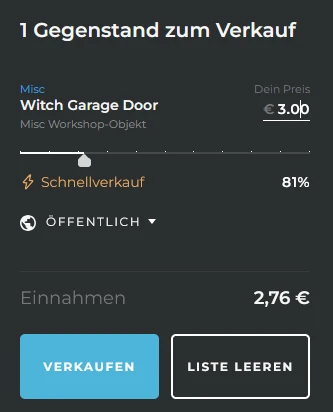
- Select skins and set the price. The slider shows your price relative to Skinport’s suggestion: around 95–100% it is marked as recommended, further down as a quick sale.
- The dialog shows what is left after the fee – for example €2.76 at €3.00.
- Click Sell and accept the Skinport bot’s trade offer in Steam. The skin is then listed on the market.
- After the sale the amount is credited within 1–2 working days and paid out by bank transfer – automatically daily, weekly or monthly. Skinport requires an identity check for payouts.
Selling and payouts must be supported in your country. Check this before transferring your skins; use the information in your Skinport seller account.
How to sell on the Steam market
- Open your inventory in Steam, select the Rust skin and click Sell.
- Enter a price: Steam shows what you receive and what the buyer pays including fees. The cheapest listing is shown right next to it.
- Confirm the listing in the Steam app (by email without the authenticator). As soon as someone buys, the amount goes to your Steam wallet.
To sell without an additional market hold, the Steam Guard Mobile Authenticator must have been active for at least seven days. Otherwise Steam can hold listings for up to 15 days. Check the release date shown by Steam.
Selling safely
- Do not rely on promises of payment: direct buyers from chats may take your skin without paying. Rust trades do not have the reversal feature available through CS2 Trade Protection.
- No “middleman” from a chat: alleged escrow agents or Steam employees who message you are scammers.
- Check the trade offer: when selling you only give the skins you listed. If other items, a different recipient or an offer you did not trigger appear, decline.
- Check your API key: an unknown key at steamcommunity.com/dev/apikey is a warning sign of unauthorized account access. Revoke it, change your password and review authorized devices. Do not confirm unfamiliar offers.
More scams and a checklist for other trading sites are in the buying guide.
Common questions
Can I withdraw Steam wallet funds?
No. According to Steam Support, Steam market proceeds can neither be withdrawn nor transferred to another Steam or bank account. You can only spend them on Steam, including gifts for others.
Why do I get less than my inventory is worth at Steam prices?
Inventory values are usually based on Steam prices, which include 15% fees, and on the cheapest listings – not on actual sales. On the Steam market you keep about 87% of it, and on Skinport the market price is usually lower. The table above shows how much is left per price range.
Can I sell Rust skins for PayPal?
Skinport pays out by bank transfer only. Some instant-sell sites pay via PayPal or crypto, but buy below market price in return. Check such a site first with the list from the buying guide.
Do I need to verify my identity to sell?
Not on the Steam market. Skinport verifies your identity in several steps for payouts; according to Skinport there is no payout limit. Only enter ID details on the real site, never in a chat.
Why can’t I sell a skin?
Usually it cannot be traded: of 6,476 designs in the Rustomize catalog (as of 12 Oct 2026), 927 are not tradable, including 609 Twitch and Kick drops. New store skins are locked for their first week. Every skin page shows the status, and the trade hold guide explains why.
When is the best time to sell?
Our data does not establish a reliably best time to sell. Look at your skin’s history and current offers, then decide whether a quick sale matters more to you than waiting for your asking price.
Sources
- Steam Support – Community Market FAQ (fees, requirements, wallet balance)
- Skinport – FAQ (selling fee, payout, verification)
- Skinport – selling fee
- Skinport – Rust market
- Steam Support – Trade and Market Holds
- Steam Support – Trade Protected Items (CS2)
- Steam Support – Trade and Market Confirmations
- Skinport – Selling fee thresholds by currency